How to Change Your Server Title on Your Minecraft Server
What Is a Server Title?
When choosing a Minecraft Server to join, the first thing you will find is the server title or description. Many of these can be colorful and include the server name, the number of players, some of the server game modes, and much more. This title on the server is modified through the MOTD value (which stands for "Message of the Day"), and you can place any values of your choice to have all the features that you have seen in other Minecraft Servers.
In this tutorial, we will explain how you can set a MOTD for your Minecraft server.
Before Starting
Make sure you have an active Minecraft Server; if not, consider using Iceline Hosting as your game hosting provider. Start your Minecraft journey today!
It is also recommended to use a third-party website, such as Minecraft tools, to set the MOTD. This will ensure you get the correct format for the text.
How to Set the MOTD
- Head to the Iceline Game Panel and stop your server.
- In your panel menu, go to "Files".
- Locate the “server.properties” file and open it.
- Locate the “motd=” variable; this is where you will be changing the title.
- To do this, we recommend using a 3rd party app like Minecraft tools, as previously mentioned. You can customize it how you would like, see a preview, and simply paste it into the MOTD section.
- Save the file, then head back to the console and restart your server.
Changing the server MOTD through the Iceline AI
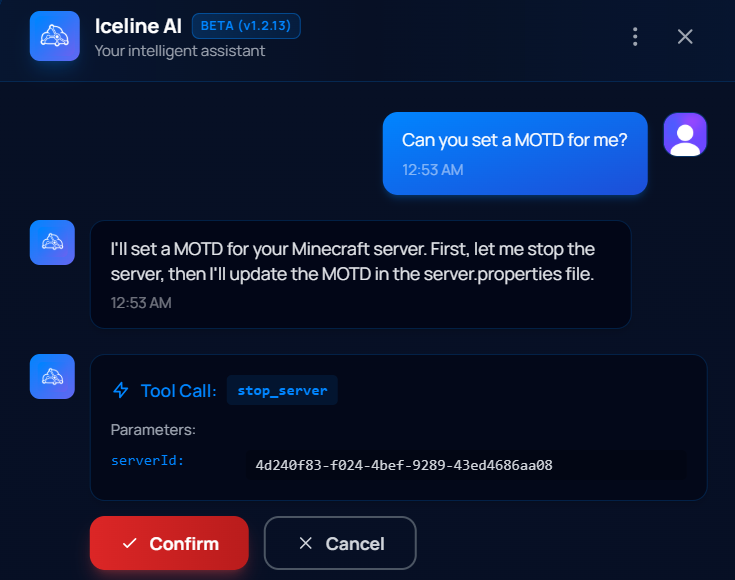
The Iceline AI is a powerful tool included with our game servers that you can use to manage your server. Through a simple conversation, you can ask the AI to make any change for you!
To change your server MOTD, just ask the AI to do it for you! The AI will send the command or make the change to your configuration file and ask you for confirmation. Save yourself the trouble!
Facing Any Issues?
If you have set this in your server.properties and it is not working, make sure that you have used the correct format. Once you check that you have used the correct format, make sure the server has been fully restarted, as any change to the main config files requires this.
If you have checked all of these and are still having issues, feel free to contact our support team. We'll be happy to help!