How to Update your S&Box Server Name
Server names server as personal identifiers for a server and are a good way to ensure your community stands out, taking this into consideration, it's really important to choose a unique and remarkable name for your server that helps describe the main theme of the server, this way, your players will be able to identify the server and join again easily in the future.
In this guide, you'll learn how to change the server name of your s&box Server.
Before Starting
Make sure you already have a working Dedicated s&box Server. For this, Iceline Hosting is your best choice!
Iceline Hosting game panel supports instant setup, along with some features like an automatic Turbo Mode for mod-heavy CPU performance bursts (like world generation), enterprise-grade DDoS protection via the Iceline Shield Panel, and global locations (London, Frankfurt, Virginia, Texas, Oregon, Singapore, Sydney) to ensure low-latency play. If you don't have a server, feel free to check our available plans and start your journey today!
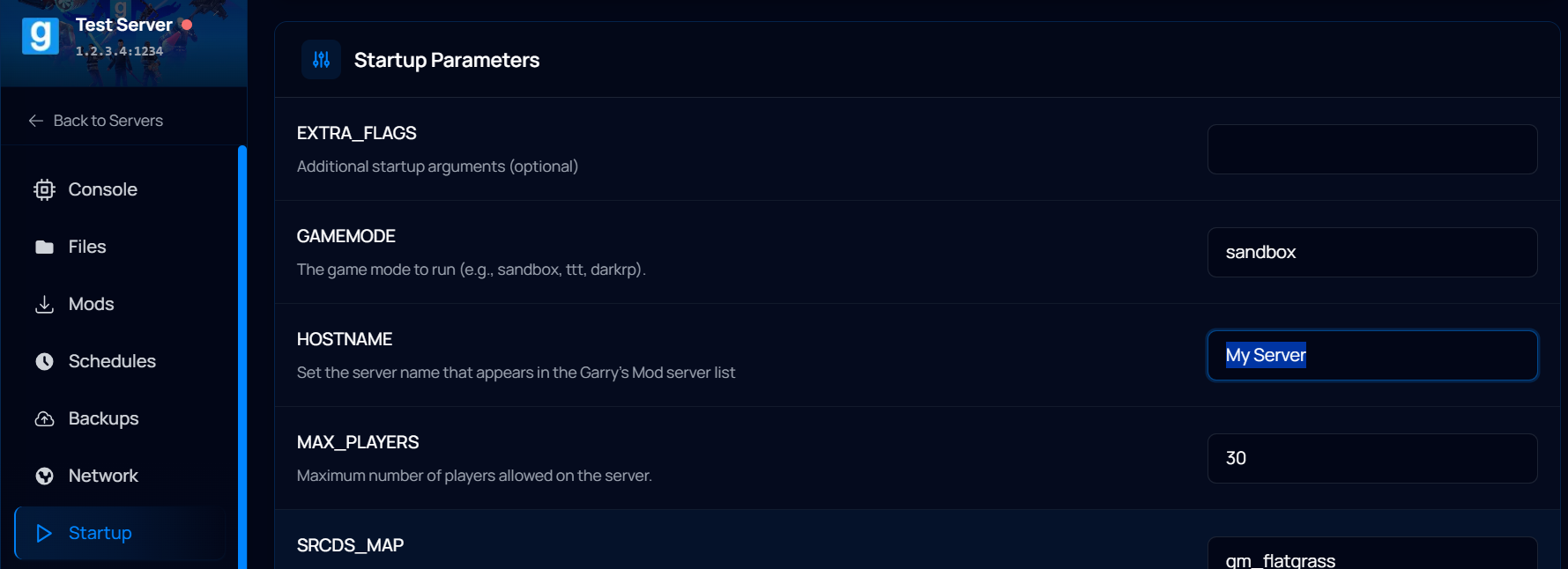
How to change the Server Name through the Game Panel Startup tab
Thanks to the Iceline Game panel, options like the server name can be edited through the server startup tab, saving you some time! Just follow these steps:
- Log in to your Iceline Game Panel.
- Select your s&box server and turn it off.
- In your navigation bar, click on Startup.
- Replace the default value from HOSTNAME with anything of your choice.
- Click on Save Changes when you're finished.
- Restart the server.
How to change the s&box Server Name through the configuration file
- Log in to your Iceline Game Panel.
- Select your s&box server and turn it off.
- In your navigation bar, click on Files.
- Locate the configuration file and open it.
- Inside the configuration file, change the Hostname variable to anything of your choice, make sure it's a unique name!
- Click on Save File when you're finished.
- Restart the server.
Changes will be automatically applied to your server on restart. Make sure your server name does not contain unallowed characters; otherwise, it may not show up properly.
Ask the AI to change the server name for you!
Iceline Hosting features a powerful AI tool included with all our game servers that can be used to speed the management process and automate certain tasks. It supports instructions through natural language and checks the server console for potential errors. Learn more about our Iceline AI assistant here!
Instead of making these changes yourself through the configuration files, you can just ask the Iceline AI to change the server name for you! The AI will check your configuration file, apply the changes, and request your authorization to process them. Automatically and in just a few seconds!

Facing any issues?
Make sure you've used valid characters for your server name; using invalid characters may prevent you from finding your server on the server list. If you continue having issues, feel free to contact us, or ask the Iceline AI to check your server console and suggest changes to you.