How to Whitelist a Player on Your Minecraft Server
What Is a Whitelist?
Having a whitelist on your server is essentially a system that allows you to choose who can and cannot join your server. If you want to have a private Minecraft server for just friends or family, a whitelist is just the way to do so. This is the ultimate built-in protection against griefers or hackers, and it is very easy to set up as there are no plugins required for it. In this tutorial, we will explain how you can set up a whitelist on your Minecraft Server.
How to enable the Whitelist through the console
When typing commands in the console, do not use a "/"; all of the commands for the whitelist can be used in-game as well if you are a server operator. If you make sure you are using a / to add them.
- Go to the Iceline game panel.
- Select your server and click on “Console”.
- In the console, you will need to type “whitelist on”.
- Once you type that command, you should see a message saying the whitelist was turned on.
- To turn the whitelist off again, type “whitelist off”.
How to enable the Whitelist through the configuration file
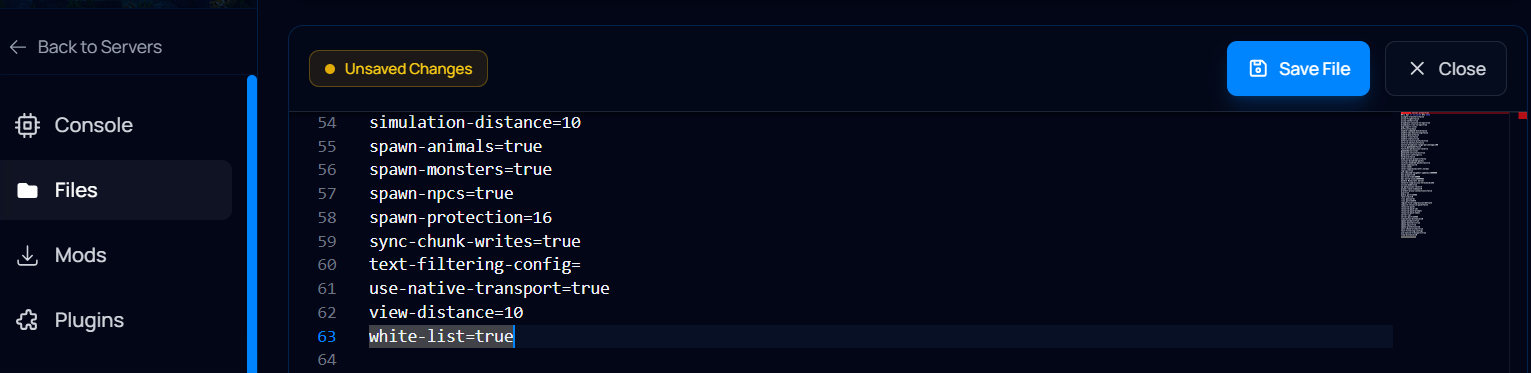
The whitelist can also be enabled through the minecraft server configuration file. To do this, just follow these steps:
- Go to the Iceline game panel.
- Select your server and stop it, then click on "Files".
- Locate your server.properties file and open it.
- Locate the "white-list" convar and change it from "false" to "true".
- Click on Save File.
How to Add a Player to the Whitelist
- Head to the console in your Iceline game panel.
- In the console, type “whitelist add playernamehere”.
- Once you type this, you should see a message saying the player was added to the whitelist.
- You can remove them from the whitelist by typing “whitelist remove playernamehere”.
In addition to this, you can also add/remove players to the whitelist manually by editing the whitelist.json file, but it's recommended to whitelist through commands instead.
Making a whitelist for your Minecraft Server through Iceline AI
The Iceline AI is a powerful tool included with our game servers that you can use to manage your server. Through a simple conversation, you can ask the AI to make any change for you!
To make a whitelist for your Minecraft server, just ask the AI to enable a whitelist and to add your username to the whitelist. The AI will ask for confirmation to send the commands through your console, and that's it! You can even use it to remove players from the whitelist if you wish; save yourself the trouble!
Facing Any Issues?
If you have followed the steps in this guide to set up the whitelist and are still having issues, make sure that you did not use a / in the console and that your player has admin rights if you want to set it up in-game.
If you are still having issues with this, feel free to contact Iceline Hosting’s support.